Your vault on a USB drive. No cloud, no account, no trace.
Keep photos, videos and documents encrypted on an ordinary USB drive and open them with your password on Windows and Android. Nothing leaves the drive.
- One-time purchase · No subscription
- No internet permission
- Windows and Android
Three things you will not find
Cloud
Your files never leave the drive. The app does not connect to the internet: the Android one does not even declare the permission.
Accounts
No sign-up, no email, nothing that identifies you. We do not know who you are and do not want to.
Home-made cryptography
Everything is encrypted on your device with libsodium, an audited library: XChaCha20-Poly1305 and Argon2id.
Plug in, create, save, unplug
Plug in the drive
On your computer or phone, with USB-C or an OTG adapter. On your phone, its own storage works too.
Create the vault
With a long password. It is the only key: it is not stored anywhere.
Save what you want
It is encrypted on your device before it is written to the drive.
Lock it and unplug it
Whoever finds it will know there is a vault. Not what is inside.
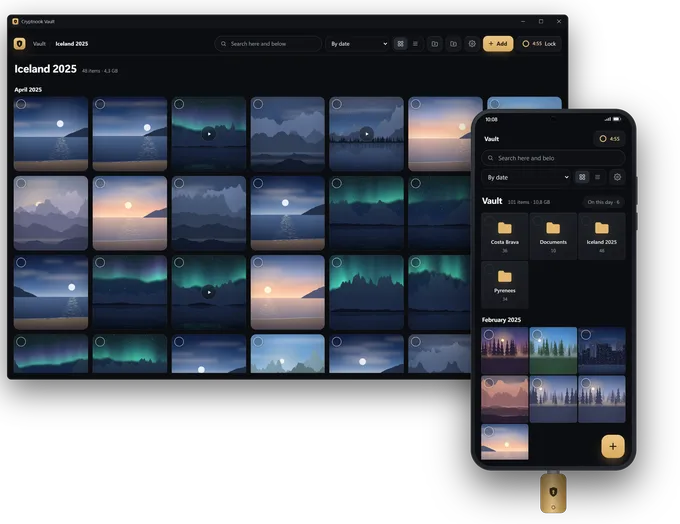
The same vault on your computer and your phone
Organise on your PC, browse on your phone. Both apps use exactly the same format, with the same password, with no conversion.
What you do not want in the cloud
A gallery, not a file manager
Direct camera
On your phone, photos and videos that never go through the gallery.
Save from Share
“Save to Cryptnook Vault” from any app on your phone.
Fingerprint
To open the vault on your phone, if you turn it on.
Auto-lock
When idle, when your PC sleeps and when you leave the app on your phone.
Folders, tags and search
To find anything among thousands.
Backups and bin
Back up the vault, check the backup and recover deleted items for seven days.
Photo enhancement
Sharpness, light, colour and resolution, on your device and offline. In a new copy.
Compare and find duplicates
Two photos side by side, and repeats tracked down.
No drive needed, too
On Android, the vault can live in the phone’s own storage.
What you should know
We say it here, not in the small print.
This is not a backup. Keep another copy of anything you cannot afford to lose.
If your computer or phone is infected, this does not protect you.
Putting a photo in the vault does not delete it from where it was.
Pay once
No subscription, no ads and no in-app purchases. Android on Google Play and Windows on Microsoft Store, each with its own purchase.
How much does it cost?
You pay once, in each platform’s store: Google Play for Android and Microsoft Store for Windows. The price will be on each store listing when it is published. No subscription, no ads, no in-app purchases.
If I buy it for Android, do I also get it on Windows?
No. Each app is bought in its own store, with its own purchase. Without accounts or a server, there is no way to recognise on Windows a purchase made on Google Play, or the other way round.
Does it work with my phone?
If it runs Android 11 or later, yes. To use a USB drive, it also has to read them, with a USB-C one or an OTG adapter. Almost all recent phones do; it takes two minutes to check.
What if I forget the password?
Then the content is lost. There is no recovery, no security question and no way for anyone to help you open it. Keep it somewhere safe.
Can you see my files?
No. Everything is encrypted on your device, there is no account, no server, and the app does not connect to the internet. What you keep does not leave the drive or the phone.